Delivery with your own drivers
Nearby orders go to your drivers; farther ones can book Uber Direct or DoorDash automatically.
Set it up
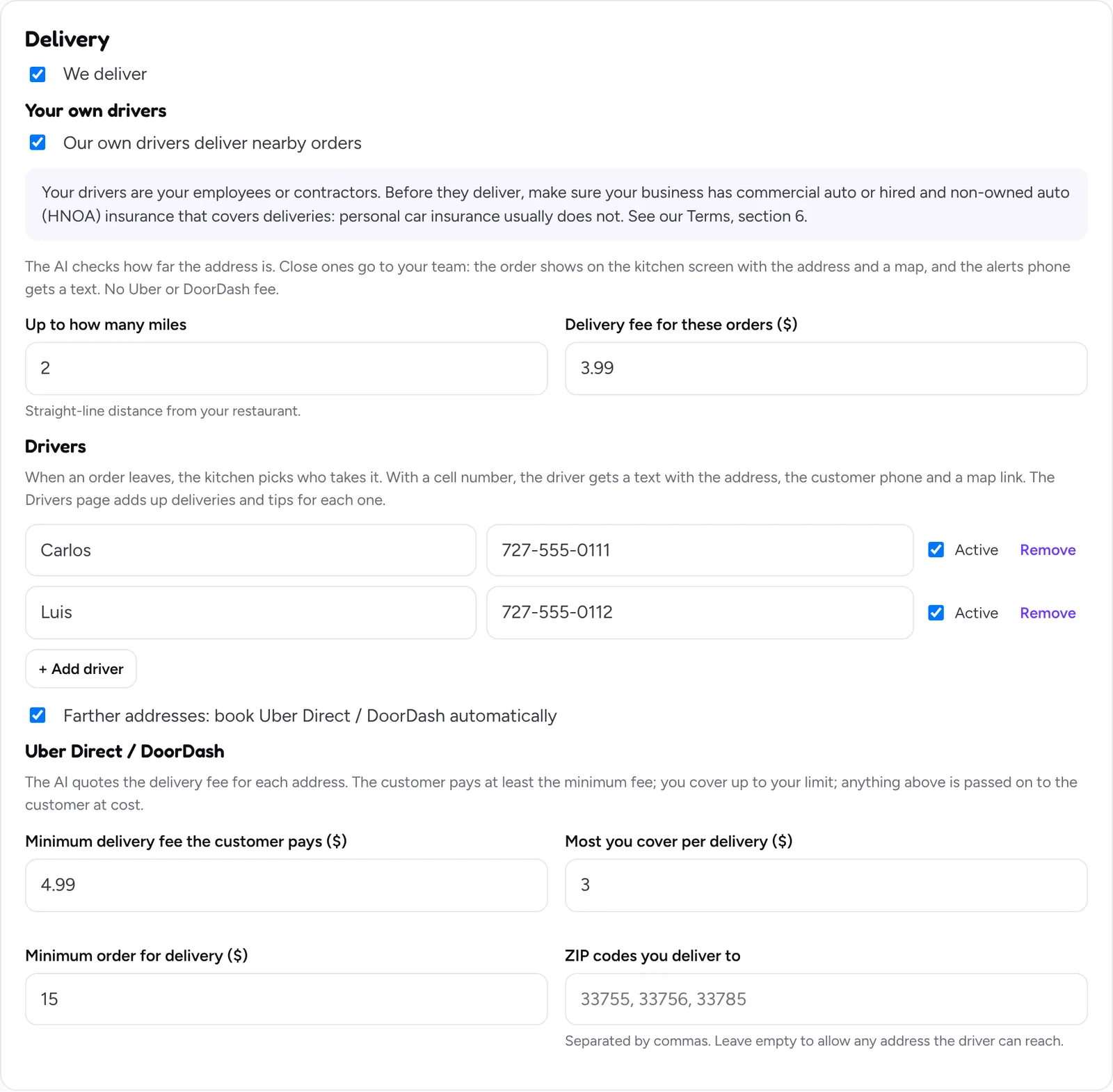
- Open Pickup & delivery and tick We deliver, then Our own drivers deliver nearby orders.
- Up to how many miles: the straight-line distance from your restaurant your drivers cover.
- Delivery fee for these orders: what the customer pays. It stays with your restaurant.
- Add each driver with their name and cell. With a cell, the driver gets a text with the address, the customer phone and a map link.
- Farther addresses: tick “book Uber Direct / DoorDash automatically”, or leave it off to offer pickup instead.
- Tick the box confirming your drivers agreed to get work texts, and click Save changes.
Every day
- Nearby orders show on the kitchen screen with the address and a map. When the order leaves, the kitchen picks the driver who takes it.
- Tips on own-driver orders go to the driver. The Drivers page adds up deliveries and tips for each one.
Insurance
Your drivers are your employees or contractors. Before they deliver, make sure your business has commercial auto or hired and non-owned auto (HNOA) insurance that covers deliveries: personal car insurance usually does not.
Still stuck? Write to [email protected] with your restaurant name and we’ll get back to you.